I am back after long time. I have a requirement to display a grid using sript call back. I search on net and found that all solutions suggest that generate XML file and pass it to java script. Itrate through XML file and generate "
Javascript Code
<script language="javascript" type="text/javascript">
function GenerateGrid(object)
{
var message = document.getElementById("ddlEmployeeName").value ;
var context = '';
<%= strCallback %>
return false;
}
function GenerateGridData(message,context)
{
// Here lblGrid is name of my lable.
document.getElementById("lblGrid").innerHTML = message;
}
script>
Server Side Code
Here I have removed extra code.
public void RaiseCallbackEvent(string eventArgument)
{
// Create new GridView and Bind it
GridView gvGridView = new GridView ();
gvGridView.DataSource = ds;
gvGridView.DataBind();
// Get string writer and HTML writer
System.IO.StringWriter sw = new System.IO.StringWriter();
HtmlTextWriter ht = new HtmlTextWriter(sw);
// This will generate HTML
gvGridView.RenderControl(ht);
strData = sw .ToString();
}
public string GetCallbackResult()
{
// return value to javascript
return strData;
}
How simple!!! I have displayed the grid without XML file and iteration logic of javascript. Then I remember a good quote of my friend, the rule of "KIS (Keep It Simple)". I am working on paging and editing of grid with script callback and will soon post the blog.
Bye and do happy programming.


Thursday, March 02, 2006
Script Call back in Asp.net 2.0
Script Call back in Asp.net 2.0
Today I need to use script callback in my project. I search on net for that. I found few results. But still something is missing in that and code shown by them is not working.
Then I tried to solve the problem and luckily I succeed. Example will fill Address Drop down List on change event of Name drop down list.
The Client Callback feature consists of two things: ICallbackEventHandler
interface and Page.ClientScript.GetCallbackEventReference method.
Page.ClientScript.GetCallbackEventReference method has many overloaded version. I will explian which I used in code.
string strCallbackRef = Page.ClientScript.GetCallbackEventReference(this, "message", "showResult", "context", "showError", true);
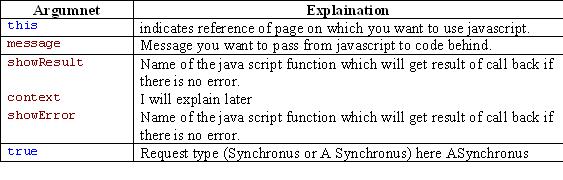
Return type of GetCallbackEventReference is string. You need to place this string at client side in java script. This string will contain reference to XMLHTTP which asynchronously call the page referred in first argument of function.
You need to implement two methods of ICallbackEventHandler interface. First is public void RaiseCallbackEvent(string strArgFromClientSide) which is the method that execute on XMLHTTP request. Second is
public string GetCallbackResult() which wil return the result of execution of first method to javascript function mentioned in third argument of GetCallbackEventReference method.
I think we read to much. Now take a look at code I used.

Below is code for aspx page.

Explanation
Once you copy past the code and do necessary changes for connection string and Select query of Data Adapter everything is done. Just press F5 and you will see the result.
Now see the view source for this page. You will see following thing.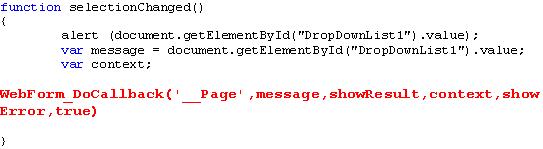
You can see this red line in your view source (not in red J) . This is the line which cause XMLHTTP request to the page and returns the result. Now see below and you will understand what happened at run time.
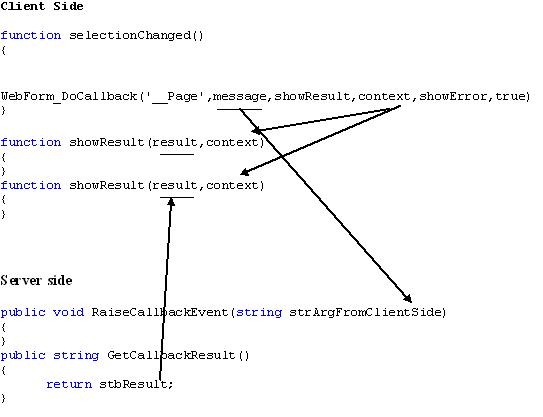
I hope this has explained you how script call back works. The only remaining thing is ”context”. This argument is used when you have used more then Async XMLHTTP request. It is not sure that all XMLHTTP request retursns the result in same order as they called. You can identify each request using different context.
Conclusion
To use scrip call back first you need to get reverence of function using GetCallbackEventReference method. Use that reference in java script function.
Then you have to implement two function of ICallbackEventHandler handler.
If your XMLHTTP request execute successfully, java script function mentioned in third argument of GetCallbackEventReference is called and returns you result. If your XMLHTTP request cause an error to occur java script function mentioned in fifth argument of GetCallbackEventReference is called.
Feel free to ask any questions ( but not hard :) ).
Wednesday, March 01, 2006
I Cleared MCP
12th February Sunday is one of the most happiest day in my life. I cleared MCP (Developing Web Application using ASP.NET and C#). I and my friend Nilang both were passed exam on same day. He is the one who motivated me in preparation of exam.
I read two books. First is MS Press Developing Web Application using ASP.NET and C# and second is Exam Cram by Amit. If you have enough time first go through MS Press book and then read Exam Cram. I really appriciate Exam Cram as very very helpful book.
Last but not list if you want any help regarding Exam or material. I will surely help you. I would like to thanks two another friend who hlped me lot. Dhruvin and Chinmay Thanks a lot.
Tuesday, April 26, 2005
How E-mail Header Works
Often, you can isolate it to a single machine by analyzing the one portion of the header your own e-mail server provides. Figure 1 shows a real-life example (all real names have been changed).
by lodestone.techtreaser.net with ESMTP
id HAA19820
for
2005 04:40:22 -0500
From: mailto:firstname.lastname@techteam.state.in
Message-Id:
<200504051530.haa19820@lodestone.techtreaser.net>
To: sample@techtreaser.net
Subject: Re: Your Applicatiom Date: Fri, 4 April 2005 09:36:35 -0600
X-Priority: 3
X-MSMail-Priority: Normal
The important data is in the Received: line. Each time a server receives an SMTP message, it is supposed to add a new Received: line at the beginning of the header block. The topmost line will have been added by your server.
My e-mail server added the topmost line in this example; since there are no other Received: lines further below it, it is probably safe to assume that it was delivered directly to my system by an embedded mini-SMTP engine running on an infected machine. Had there been more than one Received: line, the first one might have been a relaying mail server. As servers are not as likely to be infected as clients, you may want to skip down to the second entry.
Your concern should lie with the information provided by your server.The data in parentheses following the "from" information supplied by the sender. The sender-provided information will almost always be invalid in virus and spam mail, so you can just ignore it.
In this example, the information added by my server consisted only of the IP address of the machine handing me the message—10.10.8.112. That's the least amount of information you'll get. There may also be a machine name before the IP address, but still within the parentheses. If present, it is also trustworthy information and saves you the next step.
Two tools are needed to discover and verify the name of this machine and the owner of its domain: nslookup (host, on some operating systems) and whois. Both nslookup and host provide DNS lookups against hostnames or IP addresses. Figure 2 shows example of nslookup:
Figure 2 Use of nslookup
c:\nslookup 10.10.8.112
server: Name of your mail server
Address: IP Address
Name: Name of sender's mail server
Address: IP Address
Me

Chirag Darji
About Me

- Raja
- Ahmedabad, Gujarat, India
- MCP(Developing ASP.NET Web Application using C#) Team Lead, Cygnet InfoTech Ltd.